Search

Sponser

Wednesday, 16 January 2013

Sponser Banner : FC2 SNS

Yes That's right you can make money with sponser banner in fc2 sns(social networking site).

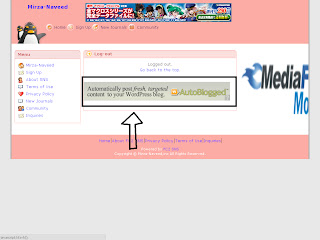
post sponser banner on the main screen

Yes That's right you can make money with sponser banner in fc2 sns(social networking site). post sponser banner on the main screen

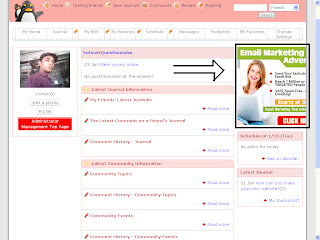
Post sponser banner on the side

Post sponser banner on the side

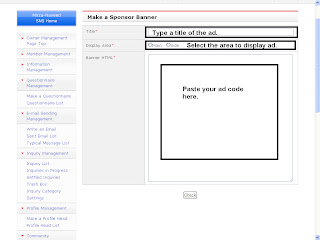
Make a Sponser Banner

Type sponser Title, select display area of the banner, and paste banner code.
Make a Sponser Banner  Type sponser Title, select display area of the banner, and paste banner code.

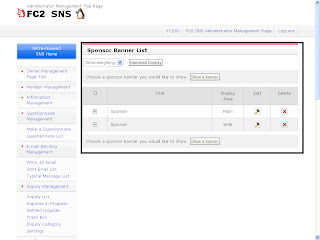
Sponser Banner List

You can see the list fo your sponser banners.
Sponser Banner List  You can see the list fo your sponser banners.

Saturday, 12 January 2013

Make a community and BBS Category : FC2 SNS

There are already some categories are listed in community and bbs category. (Entertainment, hobbies, culture, Arts, Computers, Internet, Sport, Liesur, study, games, life style, buisness, economy, other.).
You can make your own category for community and bbs.

Make a Community Category

Type a genre of the category and then type category in categories area.
There are already some categories are listed in community and bbs category. (Entertainment, hobbies, culture, Arts, Computers, Internet, Sport, Liesur, study, games, life style, buisness, economy, other.). You can make your own category for community and bbs. Make a Community Category  Type a genre of the category and then type category in categories area.

Community Categories List

You can see the list of community category and arrange it as you want.
 Community Categories List  You can see the list of community category and arrange it as you want.

Make a BBS Category

Type a genre of the category and then type category in categories area.
 Make a BBS Category  Type a genre of the category and then type category in categories area.

BBS Categories List

You can see and manage the list of  bbs categories.
 BBS Categories List  You can see and manage the list of  bbs categories.

Thursday, 10 January 2013

Inquiry Management Users Feedback FC2 SNS

In Inquiry management you can see feedbacks from your network visitors.you can add categories in inquiry/feedback.

Category

You can Add your own category or check the list of  inquiry categories.
In Inquiry management you can see feedbacks from your network visitors.you can add categories in inquiry/feedback.  Category  You can Add your own category or check the list of  inquiry categories.

E-mail Sending to your Fc2 Social Network Users : FC2 SNS

Write an Email

You can send email to your all fc2 sns members or send email to members who accepted recieving emails. go to the fc2id management page, Click on the E-mail Sending Management -> Write and Email. Fill out the Form, Title(Subject), Destination(To all members OR Members who agreed to recieving emails), and message(your message to user).
Write an Email  You can send email to your all fc2 sns members or send email to members who accepted recieving emails. go to the fc2id management page, Click on the E-mail Sending Management -> Write and Email. Fill out the Form, Title(Subject), Destination(To all members OR Members who agreed to recieving emails), and message(your message to user).

Change the Email Format

To Change the Email Format click on the link below form(change the email form).
  Change the Email Format  To Change the Email Format click on the link below form(change the email form).

Give a Title(Status), Sender email address, Sender Name, and Message body.
 Give a Title(Status), Sender email address, Sender Name, and Message body.

Sent Email List

Click on the Sent Email list to see the list of sent email.
 Sent Email List  Click on the Sent Email list to see the list of sent email.

Typical Message list(Message Templates)

You can use readymade message templates.
Typical Message list(Message Templates)  You can use readymade message templates.

Questions Management : Fc2 SNS

Make Questions and options for user to give answer. Give a title to your Question, Select pulish date and the end date of your Question, Type your Question in Comments area, Then options for question,
Note.type 1 option in one line.
Make Questions and options for user to give answer. Give a title to your Question, Select pulish date and the end date of your Question, Type your Question in Comments area, Then options for question,  Note.type 1 option in one line.


Saturday, 5 January 2013

Information management : FC2 SNS

In information management option. You can Write annoucements for your FC2 SNS Users, and your fc2 sns users can see annoucement on a page. You can open annoucement for all fc2 sns members.

Write an annoucement

First give a title for your annoucement then select a category for your annoucment, give a page name, setting the exposure, published date, and the period of the annoucement to be displayed, and a paragraph and picture for your annoucement.
Note: You can paste iframe code in text area.
In information management option. You can Write annoucements for your FC2 SNS Users, and your fc2 sns users can see annoucement on a page. You can open annoucement for all fc2 sns members.  Write an annoucement  First give a title for your annoucement then select a category for your annoucment, give a page name, setting the exposure, published date, and the period of the annoucement to be displayed, and a paragraph and picture for your annoucement. Note: You can paste iframe code in text area.

Annoucement List

You can edit or delete your annoucment list here.
Annoucement List  You can edit or delete your annoucment list here.

Information Category settings

You can add any category in settings for annoucement. Just give a name to category and click on check.
you can edit or delete any category from the list.
Information Category settings  You can add any category in settings for annoucement. Just give a name to category and click on check. you can edit or delete any category from the list.

Tuesday, 1 January 2013

Members Management : FC2 SNS

In member managment you can see the following topics.
     1-Number of new registered members/members list.
     2-You can set a member search option for members.
     3-you can see the registration analysis.

1-Members list

In Member list option you can see the number of new regisrations for last 5 days and a list of members.
In member managment you can see the following topics.      1-Number of new registered members/members list.      2-You can set a member search option for members.      3-you can see the registration analysis.  1-Members list  In Member list option you can see the number of new regisrations for last 5 days and a list of members.

2-Member Search

You can search any member with the following option.
Keyword : specify some keyword for searching.
Log-in permision : Enable Log-in permision no-body can search without log-in.
Name : firname and Last anme.
Nickname : must be identical.
Email : must be identical.
Sex : Gender
Age : Specify Age.
Blood type : Specify the blood type.
Single/Married.
Occupation
Hobbies
presense of a photo : Does'nt matter.
2-Member Search  Here you can specify the member search option. if any user want to search a person so what he/she can do for searching, keyword, Name, nickname, email. Keyword : specify some keyword for searching. Log-in permision : Enable Log-in permision no-body can search without log-in. Name : firname and Last anme. Nickname : must be identical. Email : must be identical. Sex : Gender Age : Specify Age. Blood type : Specify the blood type. Single/Married. Occupation Hobbies presense of a photo : Does'nt matter.

3-Registrant Analysis

In registrant analysis you can see the member registrations/ members status.
3-Registrant Analysis  In registrant analysis you can see the member registrations/ members status.

User management page : FC2 SNS

In user management page you can see your social network information like SNS Name, Opening date, members, community, participation syle, exposure settings, categories, and discription.

1-login into fc2. and click on the control panel icon.
In user management page you can see your social network information like SNS Name, Opening date, members, community, participation syle, exposure settings, categories, and discription.  1-login into fc2. and click on the control panel icon.

2-on the sns service page click on the usermanagement icon.

3-on usermanagement page you can see all the information about your fc2 sns. your SNS Name, SNS Openening Date, Members, Community, Participation style, Exposure settings, Categories, SNS Discription.
and you also can see New Registrants, Latest Members to leave and New Communities on this page.

Saturday, 29 December 2012

ADD FC2 SNS(SOCIAL NETWORKING SITE) IN FC2ID

If you decide to become a owner of a small (fc2 sns) social network
so....
login into your FC2ID.
Then click on the add services button on the left side panel.
Find out the FC2 SNS services and click on the button add this services.
If you decide to become a owner of a small (fc2 sns) social network so.... login into your FC2ID. Then click on the add services button on the left side panel. Find out the FC2 SNS services and click on the button add this services.

Choose your SNS ID your SNS ID is your fc2 social netowork address
(For example) : snsid.sns.fc2.com
then select category of your network and choose name for your netork lastly give some comments about your network.
Choose your SNS ID your SNS ID is your fc2 social netowork address (For example) : snsid.sns.fc2.com then select category of your network and choose name for your netork lastly give some comments about your network.

It will show your information which you entered to verify. click on yes.

then it will show this Msg
(*) It may take a little while until DNS is filtrated.
If you cannot log in, please try again after a while.
[Yoursnsid.sns.fc2.com]Log-in

So when your SNSID DNS will be filtrated you and others can use this.
then it will show this Msg (*) It may take a little while until DNS is filtrated. If you cannot log in, please try again after a while. [Yoursnsid.sns.fc2.com]Log-in So when your SNSID DNS will be filtrated you and others can use this.

Thursday, 27 December 2012

FC2 SNS(Social Networking Site)

Yes it's absolutly true you can make a small SNS. SNS mean Social Networking Site. If it's your hobby to make SNS / communication site so make with fc2 sns now it's free.
Yes it's absolutly true you can make a small SNS. SNS mean Social Networking Site. If it's your hobby to make SNS / communication site so make with fc2 sns now it's free. Become a FC2 SNS owner and customize site as you want. You able to make a ideal community. and enjoy communication through your own fc2 SNS. What can you do on FC2 SNS  1-Open Style OR Invitation Style 2-Design and Customize as you like. 3-Lots of useful features. 4-Linked to other fc2 services. 5-Earn Advertising income.

Become a FC2 SNS owner and customize site as you want. You able to make a ideal community. and enjoy communication through your own fc2 SNS.

What can you do on FC2 SNS

1-Open Style OR Invitation Style
2-Design and Customize as you like.
3-Lots of useful features.
4-Linked to other fc2 services.
5-Earn Advertising income.

Choose Open Style OR Invitation Syle

Open style means anyone can join and Invitation style means an invitation from a participant is required for a registration. You can choose one of these styles. Open style is shown in SNS/event/topic search. Also, an owner can hide the invitation form, so creating an SSNS only with your friends is possible.
The style can be changed anytime.
Choose Open Style OR Invitation Syle  Open style means anyone can join and Invitation style means an invitation from a participant is required for a registration. You can choose one of these styles. Open style is shown in SNS/event/topic search. Also, an owner can hide the invitation form, so creating an SSNS only with your friends is possible. The style can be changed anytime.

Design and Customize as you like

Customize SNS designs with design temolates or easy design editing functionDesigns for PC version can be designed in detail with CSS or HTML (log-in page only). Design customization makes your SNS even more creative.
Design and Customize as you like  Customize SNS designs with design temolates or easy design editing function. Designs for PC version can be designed in detail with CSS or HTML (log-in page only). Design customization makes your SNS even more creative.

Lots of useful functions

Read news through ajournalcommunityBBS,message function or RSS reader. And set up a game on My Page or chat on a community using the plug-in function. →FC2 SNS function list
Choose whether to show functions or not. Pick up functions you wnat to use and make an SNS matching your needs!
Lots of useful functions  Read news through ajournal, community, BBS,message function or RSS reader. And set up a game on My Page or chat on a community using the plug-in function. →FC2 SNS function list Choose whether to show functions or not. Pick up functions you wnat to use and make an SNS matching your needs!

Linked to other Fc2 services

Paste an FC2 video onto your journal or community and set up the FC2 chat or FC2 vote with the plug-in function. The operation can be done directly on the SNS, which saves your time.
Linked to other Fc2 services  Paste an FC2 video onto your journal or community and set up the FC2 chat or FC2 vote with the plug-in function. The operation can be done directly on the SNS, which saves your time.

Earn Advertising Income!

Set up an ad using the sponsor banner function and make some money at the same time!

Recommeded Links